Tap to talk
Tap the mic or press Alt+M and talk it through. Local recording stops on silence, another tap, or after 15 seconds. Tab moves keyboard focus. Optional wake detection has its own setting and starts off.
More on thisStart with Notes, memory, documents and voice. Open a group below for its full capabilities, status and limits.
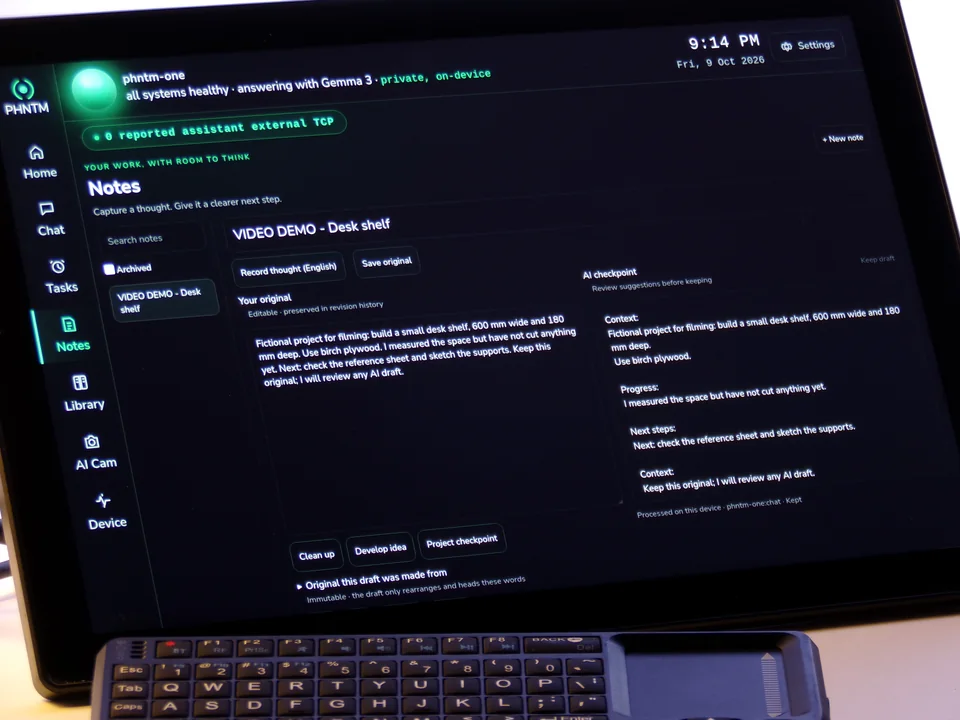
Type or dictate a note, then review a separate AI draft. Long notes can take several minutes.
Local capabilities, optional connections and planned additions. Each card shows its status. “Documented” means in the accepted manual; “verified on dev” names a development check, not complete retail release certification.
Tap-to-talk records locally when you start a turn. Optional “Hello Phantom” detection listens for the phrase locally when enabled; it starts off. See the separate limits below.
Tap the mic or press Alt+M and talk it through. Local recording stops on silence, another tap, or after 15 seconds. Tab moves keyboard focus. Optional wake detection has its own setting and starts off.
More on thisEnable local “Hello Phantom” detection in Settings, say the phrase, wait for Listening, then ask a general question. Off by default and English-only. This temporary conversation has no personal memory, documents or action tools. Noise can cause misses or false triggers; room reliability has not been established.
More on thisA local morning briefing can summarize reminders, recent memory and device status. Its default scheduled time is 7:45; speech, clock readiness and the current operating state determine whether it runs.
More on thisCatch an idea before it wanders off. Type a note or record up to 60 seconds, review the transcript, then choose Clean up, Develop idea, or Project checkpoint. Originals stay separate from AI drafts. Processing stays local in every mode; long notes can take several minutes.
Planned 1.0 capability, not yet release-verified: reading documents and notes aloud. Current spoken chat replies are a separate function.
Text replies support ten language choices. Speech in all ten languages remains planned for 1.0, not yet release-verified. Do not assume a text-language choice provides the same spoken support.
Routine proactive speech follows your voice setting and quiet hours. Urgent temperature or storage warnings may bypass quiet hours. Typed questions are answered silently.
More on thisSee which brain answered, the memories and document pages used, elapsed time and what left the box. Today’s bookkeeping repair stops certain storage and history failures from being counted as successful answers. A receipt helps you inspect an answer; it does not make the model infallible.
A private memory of the people, projects, decisions and preferences in your life, kept on the box and recalled by meaning.
“Remember that…” gives a detail a home on your device. Search saved memories by meaning, review them, and correct or remove them. Earlier exports and backups are separate copies to manage yourself.
More on thisTell it the budget is now $45k and the new figure replaces the old one instead of sitting beside it.
More on thisRemove a memory from the active record and search index. Deletion does not erase copies in earlier exports or backups.
More on thisThe Memory Constellation shows what it knows as a map: a line between two memories means they share something.
Every past conversation is searchable by meaning. Keep it forever, a year, six months or 90 days, or clear it.
More on thisOne search box on the home screen looks across memories, documents, reminders and conversations at once.
Keep reminders and your own loose ends in view. Timers, alarms and some everyday tool packs below remain planned; their labels matter.
Save one-off or recurring reminders on the device. Today’s accepted fixes preserve pause state, recurring schedules across timezone changes and pending delivery records. Alerts still depend on a verified clock. No RTC coin cell is installed, so an offline cold power loss can leave wall-clock time unknown. Timely offline alerts after that power loss are not established.
More on thisPlanned 1.0 capability, not yet release-verified: several named kitchen timers with on-screen countdowns and completion sounds. Restart timing has not been established.
Planned 1.0 capability, not yet release-verified: speaker wake alarms. Do not rely on untested restart or offline-clock behavior.
Notes is available on the current device. Shopping-list packages use the local skills framework; a preinstalled pack of shopping, to-do and everyday tools remains planned 1.0 scope, not yet release-verified.
More on thisWhen you say "I need to call the bank", it keeps that in view until you close it. It only tracks what you said yourself; it never invents tasks.
More on thisIn Autonomous mode, it lists, adds and changes events on your Google Calendar from your Telegram. Every change waits for your yes.
More on thisDocument retrieval and text recognition run locally. References help you inspect an answer; they do not make it infallible.
Bring PDF, text and Markdown files through PHNTM Drop on your home network. Ask about them in Private mode. Answers can include file and page references when retrieved passages support the answer; check the source, because citations do not guarantee correctness.
More on thisJPEG/PNG photos and scanned PDFs use local text recognition. Ask about recognized text with document references. OCR can miss or misread text; this is not general image understanding.
Planned 1.0 capability, not yet release-verified: local Wikipedia and reference packs with source-linked answers. The current local model can answer general questions, but that is separate from a reference library.
Open PHNTM Drop from a browser on your home network to send files to the device for local indexing. Private-mode questions stay local; optional cloud answers can include retrieved excerpts.
More on thisThe local skills framework is documented. A preinstalled set of unit conversion, world clock and list tools remains planned 1.0 scope, not yet release-verified; available packages require owner installation.
More on thisAsk about device status, time or network activity. These answers use device facts rather than waiting for the language model; they do not establish the speed of open-ended answers.
Planned 1.0 Home Assistant control over your network, not yet release-verified. It would use the hub you already run; connected equipment may have its own cloud dependencies.
Planned 1.0 Home Assistant capability, not yet release-verified: control selected lights, plugs, switches, scenes and thermostats through the hub you already run.
More on thisPlanned 1.0 Home Assistant capability, not yet release-verified: a local bridge with the hub token kept on the device. Your hub or connected equipment may still use its own cloud services.
More on thisPlanned 1.0 Home Assistant capability, not yet release-verified: trigger scenes configured on your existing hub.
More on thisPlanned 1.0 Home Assistant capability, not yet release-verified: locks and garage doors would require on-screen confirmation.
More on thisYour phone talks to the box directly on your home network. Away from home, Telegram is there if you want it.
Scan the QR code on the screen and a private app opens in your phone's browser: chat (your lists work there too), reminders, memories, open loops, documents, search, backup and restart. Same home network, no account, no cloud relay.
More on thisPlanned 1.0 capability, not yet release-verified. Each phone or browser gets its own key. The paired-devices list on the screen shows them all, and you can revoke any one.
More on thisLink your own Telegram and you can chat, set reminders and get alerts from anywhere, plus a status console (/status, /health, /diagnose). Off until you connect it; those messages travel through Telegram.
More on thisClaude, on your own Anthropic key, acts for you from your private Telegram chat: it checks the device, handles reminders, drafts and sends email and manages your calendar. Every send or change waits for your yes, bound to exactly what you saw, and the yes expires after ten minutes.
More on thisPrivate mode runs local inference. Optional messaging and connected accounts have separate network paths; the device provides tools to inspect them.
Local chat, memory, document retrieval and speech run on the device in Private mode. Connected Telegram, email and calendar accounts have their own network paths. Optional cloud-model answers send context to your provider.
More on thisObserve the assistant’s own network activity beside sampled whole-machine traffic for 60 seconds. Local chat should have no external sends with integrations disconnected. Attribution can be incomplete and short connections can be missed; cross-check with system tools.
More on thisTake your data with you on a USB stick: memories, documents, notes and revisions, preferences, history, reminders and open loops, with checksums. Secrets stay off the stick. Reminder exports preserve recurrence details; importing a calendar file does not recreate PHNTM’s alert execution.
More on thisScheduled encrypted database backups keep the last seven snapshots. Restore is available when you need it. A backup is useful only if you can recover it; keep exports somewhere safe and review the manual’s recovery limits.
More on thisThe serious actions need the device password; a recovery code is shown once at setup; an optional screen lock covers the rest.
Unplug the USB microphone to disconnect its input physically. Tap-to-talk is the default; explicitly enabling local wake detection uses the microphone between manual conversations.
More on thisBring your own Anthropic key for a harder question. Off by default, every boosted answer is labelled, and what it sends is listed on the privacy page.
More on thisA supervisor checks the device every 90 seconds and fixes what it's allowed to fix, with hard limits and a written reason for every repair.
The supervisor monitors services and resources and has specific repair paths with limits and a written record. Software health checks cannot prove that the physical display is visible. See the manual for each repair and its limits.
More on thisFile and index repairs use checkpoints and verification, with rollback when checks fail. A successful check is evidence for that repair, not a guarantee that every future fault will recover.
More on thisRepair decisions use available evidence to separate likely causes from consequences. Missing evidence can keep a repair from running; diagnosis is not a promise of certainty.
More on thisImplemented self-care path; current owner-use behavior is not established by the evidence reviewed. On quiet days it introduces a small, disposable fault into something built to be broken, and watches the real repair path handle it.
More on thisPlanned 1.0 capability, not yet release-verified: a weekly summary of incidents, repairs and items waiting for approval.
More on thisImplemented self-care path; current owner-use behavior is not established by the evidence reviewed. When a better fix is handed to it, it builds and tests the change in a sealed workspace that can't touch your data. The change reaches the device only when you approve it and the update is signed, and it rolls back if the self-test fails.
More on thisEverything a careful owner needs, on the screen, with a real Linux computer underneath for the curious.
Planned 1.0 capability, not yet release-verified. Browse, install, update and remove skills from the screen. Each runs sandboxed with no network and no access to your credentials, and you approve it before it runs.
More on thisPlanned 1.0 capability, not yet release-verified. When you bring it a signed update, the Update Center shows what's in it and you tap Install. It checks the signature and every file first, runs a self-test after, and rolls back on its own if anything fails. Nothing polls for updates and nothing updates without you.
More on thisPlanned 1.0 capability, not yet release-verified. Connect your email and calendar from the screen when you want Autonomous mode to use them, and disconnect them the same way.
More on thisFiles, a text editor, LibreOffice, a web browser and a terminal, one tap away, and an exit to the full desktop.
More on thisThe owner interface provides backup restore, assistant restart and factory-reset controls. Display recovery tools do not guarantee that an intermittent physical panel fault can be repaired in software.
More on thisIt runs Debian 13 with SSH documented and never removed. The source is readable on the device under the PHNTM One Source License.
More on thisThe offered hardware configuration; planned additions remain subject to release testing.
Quad-core Arm Cortex-A76 with 8 GB of RAM and an active fan, running Gemma 3 4B with a Llama 3.2 3B fallback when memory runs short.
More on this1920×1200 IPS with 5-point touch, and a face that shows what it's doing in one honest line.
More on thisA built-in speaker and a USB push-to-talk microphone. A mini wireless keyboard with touchpad is in the box.
More on thisEvery newly shipped PHNTM One includes a 256 GB NVMe M.2 SSD with local software and models installed. Offline reference packs and a preinstalled skills collection remain planned 1.0 scope, not yet release-verified.
More on thisGigabit Ethernet and dual-band Wi-Fi. It works with both unplugged.
More on thisIt thinks at Raspberry Pi speed. Historical prototype tests report roughly two words per second, with short answers taking tens of seconds and cold loads longer. Response-time work is ongoing. Those measurements describe their published setup, not a benchmark of today’s build.
More on thisOrder your PHNTM One. Every unit is built by hand and burned in for at least 24 hours before it ships. $799 once, with no required subscription for local use.
$799 one-time · ships within 7–10 business days after payment · free US shipping · 30-day returns